
Fabric Tasks
In App Factory, the Quantum Fabric functionality is placed in the project folder with the corresponding app name from Fabric. Currently, there are four basic operations which are available for Fabric apps:
The Import, Publish, and Migrate jobs have been deprecated. To achieve similar functionality, Temenos recommends using the alternative approaches that are specified in the respective sections.
App Versioning: Quantum Fabric contains multiple versions of the same application. App Factory supports versioning of the Quantum Fabric app during Export (or) Import (or) Publish. The App Versioning feature impacts App Factory in various scenarios.
The following flowcharts explain the export, import, and publish processes in App Factory.
- Fabric Export: The Fabric export is used to export the existing Quantum Fabric application to SCM (git in our case). The following flow chart explains the process of exporting an application from Quantum Fabric. After configuring the parameters in the App Factory Console for exporting a Quantum Fabric app, and then clicking the Build button, the following process is performed at run time.
- During the export process, App Factory validates certain parameters that are provided during configuration, such as APP_VERSION, BRANCH_NAME, and OVERWRITE_EXISTING.
For detailed information on the parameters, refer to Configuring Parameters to Export an App from Quantum Fabric. - After verifying the parameters, App Factory checks out the source code and checks for the branch name.
If the branch name does not exist, the build fails. - If the branch name exists, App Factory verifies the specified app_version.
- If the app version of the build matches the app version of the Quantum Fabric app in the Git repository branch, App Factory checks for the differences between both the apps.
- If the differences in the files are found, App Factory commits and pushes the changes.
- If the differences are not found, App Factory commits and pushes the build.
- If the specified app_version does not match with the existing app_version, App Factory checks whether the OVERWRITE_EXISTING checkbox is selected. (This is done during the configuration of the Quantum Fabric app in App Factory).
For more information on OVERWRITE_EXISTING, refer Configuring Parameters to Export an App from Quantum Fabric .- If OVERWRITE_EXISTING is selected, App Factory removes the old files and commits new files.
- If OVERWRITE_EXISTING is not selected, the build fails.
- If the app version of the build matches the app version of the Quantum Fabric app in the Git repository branch, App Factory checks for the differences between both the apps.
- Fabric Import: The Fabric Import is used to import an app from the SCM to the Quantum cloud. A user must configure a few parameters to publish an imported Fabric app or execute a publish job. After configuring the parameters and clicking the Build button, the following process is performed at run time.
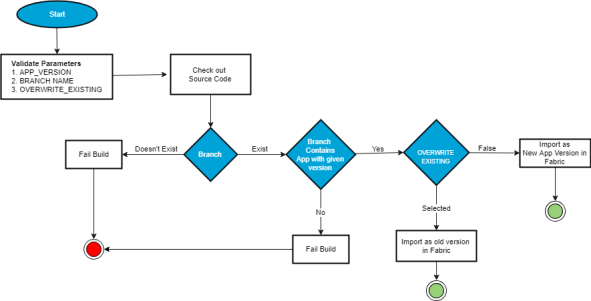
The following steps are performed at the run time to import an app to Quantum Fabric:
- During the import process, App Factory validates certain parameters provided during configuration like APP_VERSION, BRANCH_NAME, and OVERWRITE_EXISTING.
For detailed information on the parameters, refer Configuring Parameters to Import an App to Quantum Fabric. - After verifying the parameters, App Factory checks out the source code and checks for the branch name.
If the branch name does not exist, the build fails. - If the branch name exists, App Factory verifies the specified app_version.
- If the specified app_version does not match with the Fabric app_version available in SCM at the specified branch, the build fails.
- If the app version of the build matches the app version of the Quantum Fabric app, App Factory checks whether the OVERWRITE_EXISTING checkbox is selected. (This is done during the configuration of the Quantum Fabric app in App Factory).
For more information on OVERWRITE_EXISTING, refer Configuring Parameters to Import an App to Quantum Fabric .- If OVERWRITE_EXISTING is selected, App Factory imports the app as an old version in Fabric.
- If OVERWRITE_EXISTING is not selected, a new app version is imported to Fabric.
IMPORTANT: The Import job is deprecated. Temenos recommends using the
buildFabricAppjob from theFabric/Buildsfolder to achieve similar functionality. You can opt out from the CLEAN_JAVA_ASSETS and BUILD_JAVA_ASSETS options while configuring the build job to achieve the same functionality as the Import job. - During the import process, App Factory validates certain parameters provided during configuration like APP_VERSION, BRANCH_NAME, and OVERWRITE_EXISTING.
- Fabric Publish: The Fabric Publish is used to publish an existing application to a specific environment.
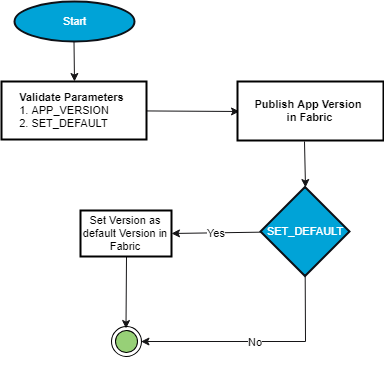
The following steps explain the process of publishing an application in Fabric to a specific environment.
- During the publishing process, App Factory validates certain parameters provided during configuration like APP_VERSION and SET_DEFAULT.
- After validating the parameters, App Factory publishes the app in Fabric.
- If SET_DEFAULT is selected, the specified App_version is set as default in Fabric.
You can publish multiple versions of Fabric applications in same app. But your visualizer app uses the services of a specific version in Fabric, that is set as a default version. To make the published Fabric version as the default version, select the SET_DEFAULT check box while configuring the Fabric parameters.
IMPORTANT: The Publish job is deprecated. Temenos recommends using the buildFabricApp job from the
Fabric/Buildsfolder to achieve similar functionality. You can opt in to the IMPORT and PUBLISH options while configuring the build job to achieve the same functionality as the Publish job. - Fabric Migrate: The Migrate Job is used to migrate an app from one Fabric Account to another. Now users can also migrate apps between Cloud and On-premises instances of fabric. Additionally, the migrate job can also publish a Fabric app after it is uploaded to Fabric.IMPORTANT:
The Migrate job is deprecated. Temenos recommend using the following approach to achieve similar functionality.
- Use the Export job from the
Fabric/Builds/FabricTaskfolder to export an app from the source environment to an SCM GIT repository. You can opt out from the IGNORE_JARS option to include the Java assets from the Fabric app. - Use the buildFabricApp job available from the
Fabric/Buildsfolder to import the app from the SCM GIT repository to the destination environment. You can opt out from the CLEAN_JAVA_ASSETS and BUILD_JAVA_ASSETS options while configuring the build to import the Fabric app with the Java assets.
- Use the Export job from the
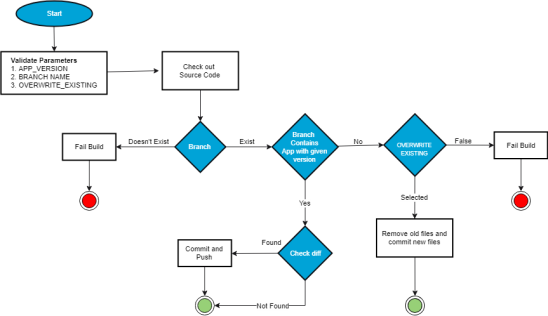
The following steps are performed at the run time to export a Quantum Fabric app from Quantum Fabric: