
Enroll Devices
Based on the choices made in Enrollment Settings, devices can be enrolled in multiple ways.
Devices can only be enrolled with Users that are already part of the system – either local Users or Users imported from AD. Devices cannot be enrolled against Users who are not part of the system.
Enrollment Process
The process can be Admin initiated – from the Device Enrollment page or Self Service portal initiated from the Devices page. While enrolling devices the User ID must be selected, which auto-populates from respective field. Administrator must provide all other fields required.
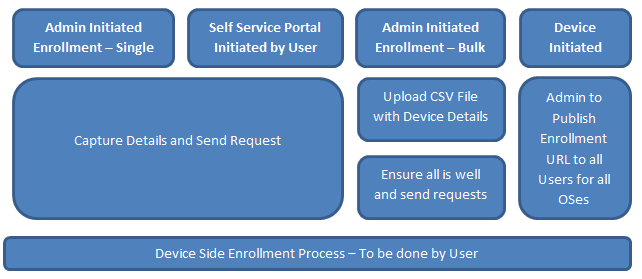
Enrollment requests are sent to the User’s email account. A typical enrollment request contains a set of instructions and a URL to be accessed from the device. The User must access the URL from the device to complete the enrollment process.
Platform Specifics
- For iOS and Android, all the three mechanisms are possible.
- For Windows 6.x devices, Device initiated is not possible.
- For Windows Phone 8, only Device Initiated Enrollment is possible. The URL to which the device must connect for the enrollment process must be provided to all the Users through email or any other means.
- For BlackBerry devices, enrollment only happens on the BES. The EMM Server will automatically sync these devices from BES, provided BES integration has been defined.
| Copyright © 2017 Kony, Inc. All rights reserved. |