
You are here: Creating an Orchestration Service
Creating an Orchestration Service
The following types of Orchestration Services are supported by Kony Fabric:
- Composite Services include:
- Concurrent Service: All specified integration services are called in parallel.
- Sequential Service: The output of one service can be used as the input of a subsequent service. Each integration service in the chain will be executed sequentially.
- Looping Service: Allows you to call the same service in a loop using the same input values until you reach a break condition or you can send in a delimited set of input values and the service will loop through the inputs until it reaches the end.
For this example, we want to return the current weather and the forecast in one service call. Therefore, we want to create a concurrent composite Orchestration Service using our GetCityWeatherByZip and our GetCityForecastByZip. This allows our app to call one Orchestration Service using the ZIP Code and getting back all the data we need.
To execute an Orchestration Service, follow these steps:
- On the Orchestration tab, click CONFIGURE NEW.
- Enter a name for the service as GetCityWeatherAndForecastByZip and click SAVE.
- Click Operation List tab, and click ADD OPERATION. t
- Enter the GetCityWeatherByZip and the GetCityForecastByZip operations.
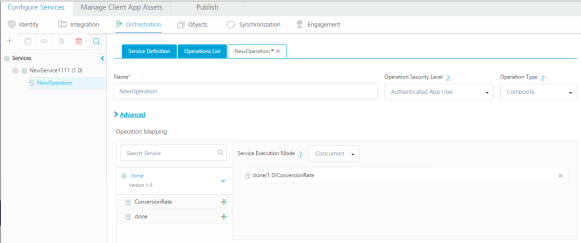
- From the Operation Type drop-down list, click Composite.
- In the pane that lists integration services and orchestration services, select an integration service or orchestration service, and expand the service. Then drag an operation to the panel under Service Execution Mode.
- Service Execution Mode drop-down list, click Concurrent.
- Click SAVE OPERATION.
| Copyright © 2014 Kony, Inc. All rights reserved. |