
Integrate a React Native App to a Kony App
Applies to Kony Visualizer Classic.
Using this feature, you can integrate a React Native app (which is developed in React Native framework) to a Kony app (which is developed in Kony framework). The React Native app is embedded into the Kony form through a container, called as the React Native Container. Furthermore, some APIs are used to communicate between the React Native app's JavaScript framework and the Kony app's Kony framework. This feature is available from Kony Visualizer V8 SP4 onwards.
React Native is a framework developed by Facebook. React Native is used to create cross-platform mobile applications.
To gain a more hands-on experience on the React Native Integration process, download and use the TaskListSample app from GitHub.
For more information on the container and communication APIs that are essential to integrate a React Native app to a Kony app, refer these sections:
Prerequisites
Before you try to integrate the React Native app into your Kony project, ensure that you compile the reactNative project and run it at least once (by which you can confirm that the project is error-free).
Requirements for the React Native Project
For integrating the reactNative app into your Kony project, the requirements for the reactNative Project are as follows:
-
You must create the reactNative project by using the react-native init <AppName> command.
- If multiple React Native apps are used in the Kony app, ensure that all React Native apps have the same dependency versions (for example, react-native": "0.57.0 ). Verify the package.json file of the React Native app to identify the dependencies.
Note: The supported React Native version in Quantum Visualizer is 0.59.x and not any other version above that.
For the Android OS, if the React Native version is less than 0.58.0, then the React Native apps bundles only armeabi-v7a, arm64-v8a and x86 .so files but not the x86_64 .so file. If the version is equal to or greater than the version. 0.58.0, then both 32- and 64-bit architectures .so files of arm and x86 are bundled with React Native app.
To check the path of the React Native app version, navigate to the React native workspace and open the package.json file. <react-native app workspace>/package.json - Ensure that the node dependencies of the reactNative project are installed. If they are not installed , install it by using the npm install command.
Note: For iOS, the application code inside the React Native AppDelegate class is ignored. Multiple apps must not have the same class files or classes with the same name.
Manually Integrate a React Native App to a Kony App
In this section, you will learn how to integrate a React Native app to a Kony app manually.
Important: Currently, Kony Visualizer does not provide the support to directly integrate a React Native app to a Kony app. As a result, you must perform the steps mentioned in the following sections to execute the integration process.
Common Steps
-
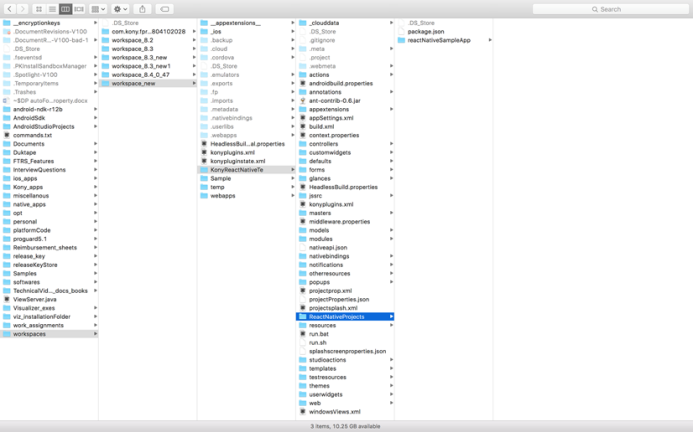
In the root folder of your Kony application workspace, create a folder and name it as ReactNativeProjects.
-
Copy the React Native app(s) to the ReactNativeProjects folder.
For iOS, follow these steps:-
Create a package.json file in the ReactNativeProjects. This json file must contain a JSON object with a single key-value pair, where the key is dependencies and its value is an array of react-native dependencies mentioned in each package.json file of all the React Native apps. For example,
//package.json file content
{
"dependencies": ["react","react-native","react-navigation"]
} - If the React Native apps contain pod dependencies, create a pod file in the ReactNativeProjects folder and mention all the pod dependencies for all the React Native apps, with the target as KRelease inside the pod file.
-
-
Run the following platform-specific React Native command from each ReactNative app root folder to generate the hierarchical JavaScript bundle:
- For Android:
react-native bundle --platform android --dev false --entry-file index.js --bundle-output android/app/src/main/assets/<AppName>/index.android.bundle --assets-dest android/app/src/main/res
Note: Create the assets folder (under <reactNativeApp>/android/app/src/main/) and also <AppName> folder under assets, if they do not exist.
- For iOS:
react-native bundle --entry-file index.js --platform ios --dev false --bundle-output ios/<AppName>/main.jsbundle --assets-dest ios
Note: Replace <AppName> with the app's name key value that is available in the app.json file, which is located at the root folder of the each React Native project.
- For Android:
Enable React Native for Andorid
You can enable the React Native feature for Android by adding its corresponding properties to the androidbuild.properties file. For detailed information on the manual steps of this process, click here.
Enable React Native for iOS
The manual steps to enable the React Native feature for iOS are as follows:
- In Kony Visualizer, go to Product > Build, select the iOS Build option, and then click Build.
- In the Console, a link will be generated, which is the path to the created KAR file.
- Click the link. The KAR file location opens.
- Rename the konyappiphone.KAR file to konyappiphone.zip
- Unzip the konyappiphone.zip file, and then paste the ReactNativeProjects folder (which is present at root folder of app. workspace) in the unzipped folder.
- Compress the contents of the unzipped folder to create an archive (zip).
- Rename the zip with extension as KAR; this creates a KAR file that contains React Native apps.
- Navigate back to Visualizer, go to Product > Run As, and then select the iOS emulator. The relevant logs in the Console are generated.
- In the Console, a link to the path of VMAppWithKonylib is created.
- Click the link to open the VMAppWithKonylib location.
- Go to the gen folder inside the VMAppWithKonylib folder in the terminal.
- Enter the perl extract.pl modified_KAR_file location command to perform the KAR file extraction.
- After the Perl extract is complete, under the Edit Scheme Build options, deselect the Parallelize Build option for the release scheme.
- For pods after the Perl extract, the VMAppWithKonyLib.xcworkspace file will be created; use this file to build the application.
If this file is present, the you must add the $(inherited) flag under the Other Linker flag setting. - The third-party React Native libs that depend on pods should set the Framework Search Path, Library Search Path, and Header Search Path as $(SRCROOT)/../../../../../Pods/ recursive.
- If the pods require any specific build settings, such as enable modules, deployment target, and swift version, you must set them.
- If the third-party React libraries have specific fonts, you must add those files to the project and also to the Info.plist file.
- If the app depends on any other framework or library file other than pods, you must add them to the project.
- If you are building in DEBUG mode, set BUILD ACTIVE ARCHITECTURES to YES.
Resolutions for Android Build Failure Issues
For Android, React Native apps are added as libraries to the Kony app, which might result in the failure of the build due to many reasons. Here are a few build failure issues when the React Native app is embedded and built for Android:
- minSDKVersion of the Kony app is lesser than one of the integrated React Native apps
Resolution: Ensure that the Kony app's minSDKVersion value is equal to or greater than that of the integrated React Native app.- Build Failure due to conflict of Gradle dependencies versions (caused by using different versions of Gradle dependencies ) in the Kony app and the React Native app and its libraries.
For example, com.android.support:appcompat-v7:26.1.0.
Resolutions:- Modify the build.gradle file of the React Native apps and its corresponding libraries to use the dependency versions same as that of Kony versions.
- Location of the build.gradle file in the React Native app: <reactNativeAppRootFolderPath>/android/app:build.gradle
Note: The latest React Native apps use support libraries version variable as ext block of the build.gradle file, which is located at <reactNativeAppRootFolderPath >/android. You can modify the supportLibVersion from this location.
The relevant example is as follows.ext {............ supportLibVersion = "26.1.0" } - The build.gradle location of the Libraries that is embedded in the React Native app is as follows: <reactNativeAppRootFolderPath>/nodemodules/<libraryName>/android/build.gradle
Note: You can view which libraries/modules are added to the React Native app by opening the settings.gradle file, which is located at <reactnativeApp>/android.
ext {............ supportLibVersion = "26.1.0" }ext {............ supportLibVersion = "26.1.0" }
- Specify the Gradle system to use the given dependency version through the configuration strategy by adding the following code in the build.gradle file of the Kony app. To add the code in the build.gradle file, do the following:
Go to Project Settings > Native > Android, scroll down to the Manifest Properties & Gradle Build Entries section, and then select the Gradle Entries tab.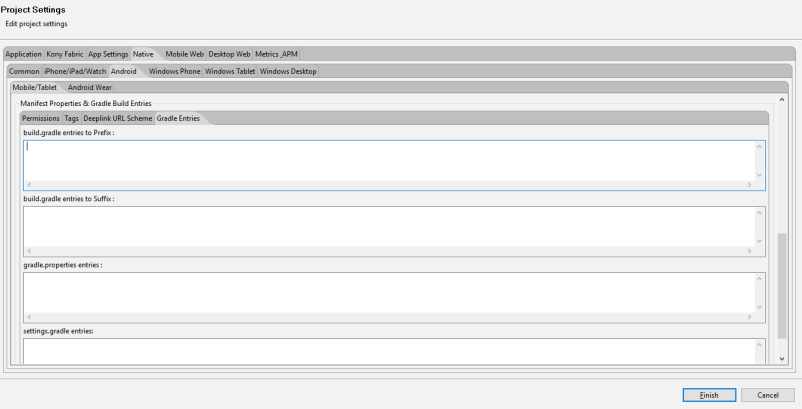
configurations.all {
    resolutionStrategy {
        force "com.android.support:recyclerview-v7:27.1.1"
        force "com.android.support:appcompat-v7:27.1.1"
    }
}
Click here to resolve other types of Gradle-dependency issues, such as duplicate classes.
- Modify the build.gradle file of the React Native apps and its corresponding libraries to use the dependency versions same as that of Kony versions.
- Build failure due to not identifying the React Native app's Gradle dependencies.
Resolution: Add all respositories of the React Native app mentioned in the build.gradle (<reactNativeApp>/android) file to the Kony app's build.gradle file. To add the repositories in the build.gradle file, do the following:
Go to Project Settings > Native > Android, scroll down to the Manifest Properties & Gradle Build Entries section, and then select the Gradle Entries tab.allprojects { repositories { mavenLocal() google() jcenter() maven { // All of React Native (JS, Obj-C sources, Android binaries) is installed from npmurl "$rootDir/../node_modules/react-native/android"}maven {url 'https://maven.google.com/'name 'Google'}maven { url "https://jitpack.io" }}}
- Build Failure due to conflict of Gradle dependencies versions (caused by using different versions of Gradle dependencies ) in the Kony app and the React Native app and its libraries.
For example, com.android.support:appcompat-v7:26.1.0.
- Build failure due to using different Build Tools versions in the Kony app and the React Native app.
Resolution: Use the same Build Tools version in the React Native app as that of the Kony Build Tools version.
Note: The Build Tools versions are mentioned in the app module build.gradle file.
android {
        ..........
    buildToolsVersion '27.0.3'
}
- Manifest merge conflicts
Resolution: Click here to solve Manifest merge conflicts.
Kony's Gradle Plugin, Build Tools, and Gradle Dependencies
The relevant information on Kony's Gradle Plugin, Build Tools, and Gradle Dependencies for V8 SP4 is as follows.
Note: The versions will change based on the plugins, so always refer the plugin corresponding to the build.gradle file for the exact Kony versions used .
Location of the build.gradle file: <workspace>/temp/<appName>build/<luaandroid/luatabrcandroid>dist/<appName>:
/** gradle android plugin version **/
classpath 'com.android.tools.build:gradle:3.2.1'
/** compileSDKVersion **/
28
/** build_tools_version **/
28.0.3
/** gradle version **/
gradle 4.6
/** support library dependencies **/
implementation 'com.android.support:recyclerview-v7:28.0.0'
implementation 'com.android.support:appcompat-v7:28.0.0'
/** Google play services dependencies versions **/
//maps
implementation 'com.google.android.gms:play-services-maps:11.6.0'
//locationlibversion
implementation 'com.google.android.gms:play-services-location:11.6.0'
//multidex_dependency
implementation 'com.android.support:multidex:1.0.0'
//dependencies_google_play_wearable_version
implementation 'com.google.android.gms:play-services-wearable:11.6.0'
//dependencies_android_support_wearable_version
implementation 'com.google.android.support:wearable:2.0.2'
//dependencies_android_wearable_wearable_version
compileOnly 'com.google.android.wearable:wearable:2.0.2'
//dependencies_google_fcm_messaging
implementation 'com.google.firebase:firebase-messaging:11.6.0'
//dependencies_google_play_pay_version
implementation 'com.google.android.gms:play-services-wallet:11.6.0'
//classpath_google_services
classpath 'com.google.gms:google-services:3.1.0'
| Copyright © 2013 Kony, Inc. All rights reserved. |